Effective documentation is essential for any research lab that wants to standardize its analysis processes and maintain a smooth workflow. If you're not convinced of the importance of good documentation, consider this: without it, your team may struggle to understand and use your codebase effectively, leading to lost time and increased reliance on you for guidance.
Who reads it
But creating and organizing effective documentation is more than just a matter of writing down instructions. It's also about understanding who will be reading it and what they are looking for. In a lab setting, it's useful to consider two main "personas" when writing documentation:
- The new team member: This could be a new graduate student, postdoc, or researcher who is joining your lab and needs to get up to speed on your codebase and analysis processes. They will likely be looking for clear, step-by-step instructions on how to use your code, as well as an overview of the overall structure and organization of the codebase.
- The experienced team member: This could be someone who has been with your lab for a while and is already familiar with your codebase. They may be looking for more advanced information, such as details on specific functions or modules, or guidance on how to troubleshoot issues they encounter.
In the next section, we'll delve into some specific techniques for creating and organizing your documentation to effectively serve these two audiences.
HenryHenry, as a new intern in the lab, was told to browse through the documentation to understand the high-level concepts of the research done by the team. His objective here is to install all the tools he will need later on his computer
MagalieAs a senior researcher, Magalie is seeking information on how to use a method that has already been developed by the lab to preprocess her data. Specifically, she is interested in learning about the available parameters and the type of output produced by the method.
What to write
To effectively organize and present information in documentation, it can be useful to divide it into several sections that address different objectives.
These sections can include:
- How-to: This section should provide step-by-step instructions on how to complete specific tasks.
- Guided tutorials: This section should offer more in-depth guidance on how to use the software or package, typically in the form of a series of examples or exercises.
- API description: This section should provide detailed descriptions of the various functions, methods, and other components that make up the software or package.
Additionally, it can be beneficial to include a separate section on installation instructions to ensure new users know how to get started.
By dividing the information in this way, different users can easily find the information they need. For example, Henry can use the installation instructions and guided tutorials to understand what the team is doing, while Magalie can look directly at the API description for specific method definitions and the How-to section for specific questions on how to process her data.
How to keep it up to date
Now that we know what to write, we need to think about how to make it easily accessible to users. Maintaining documentation that is accurate and up-to-date is crucial for providing users with the information they need, but it can be a time-consuming task for maintainers.
One way to do this is to use Sphinx to generate the documentation and then host it on a platform like readthedocs.org, which offers free hosting for open-source projects. This allows for easy access to the documentation for users and can also improve the visibility and discoverability of the project. To ease the workload, it's recommended to automate the documentation generation process. This can be achieved by incorporating the documentation build process into the project's pipeline, so that it updates automatically with every commit, merge, or release.
Another way to ensure that the documentation is always up-to-date is to regenerate the most crucial parts of the documentation with each build. For example, the How-to section can be regenerated by re-running a series of notebooks with the latest package version. This will ensure that the examples provided are accurate and executable for users. Additionally, the API description can be regenerated based on the code for each package release, thus, ensuring it's always in sync with the latest version of the software. By doing so, the documentation remains accurate and relevant for the user while reducing the workload for the maintainer.
In conclusion, having clear and up-to-date documentation is essential for providing your team with the information they need. By using a documentation structure that addresses different audiences in your lab and automating the documentation generation process, documentation can be easily accessible and discoverable for everyone while minimizing the workload for maintainers.
An example
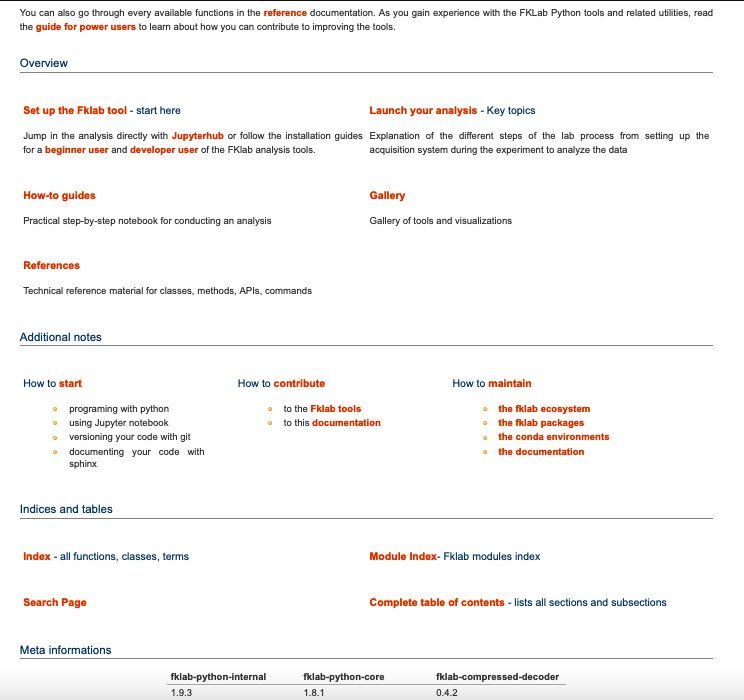
As an example, the documentation that I wrote for the Kloosterman lab follows the structure described in this article, and can be found at https://kloostermannerflab.bitbucket.io. This documentation is generated using Sphinx and is automatically updated with every fklab python package release, ensuring that it is always up-to-date. It also have a "develop" version updated every commits. The website is divided into sections that address different objectives and provides clear, step-by-step instructions, in-depth guidance, and detailed descriptions of the API.
It has proven to be effective over the last 3 years, helping to empower and speed up students in their analysis.
A funny story
Funny story, I once struggled with getting my team to read the documentation we had created. They were used to just looking at the code or asking around for information, so they did not see the value in taking the time to read the documentation. But then I had an idea, I blocked a meeting time slot and added a game into the documentation. It was like a treasure hunt, with different puzzles and clues hidden in the most important parts of the documentation. And you know what? It worked! This made the process more engaging and fun, and by the end, my team felt more familiar with the documentation and were able to use it more effectively.